
 Don’t feel like you’re out-of-the-loop if you haven’t heard of Google+ — practically no one uses it.
Sure, there are some reports about a surge of users for Google’s social network, but that’s mostly people who have been tricked into using it by accidentally clicking the wrong button on YouTube or Gmail.
The average Google+ user spends 12 minutes a month on the site.
Google knows that, but they’ve found a new way to get people to use Google+.
This year, Google is going to create a whole new kind of category: social search.
That means if you’re a writer or a blogger without a Google+ profile, your stuff will never, ever, show up in Google’s results. Ever.
This is a good thing for writers and bloggers
Google has long been the ecosystem around which websites have been designed and created, from SEO to content marketing.
Anything Google does affects the whole jungle, from the scurrying ants to the monkeys hollering in the trees.
Lately, Google has been heavily focused on content.
The goal is pretty noble: to get good stuff by knowledgeable writers to always show up at the top of search engines.
Since 2010, we’ve seen:
- Content farms that pumped articles full of keywords completely wither, because of Google’s algorithm changes, but…
- Some content farms continue to thrive
- And newspapers have cut staff in favor of content farms
Too bad for the newspapers who went the content farm route… Google’s newest plan is to incorporate Google+ into search results, so that both SEO and social search work together to find not just a well-written article, but one backed by someone who knows what they’re talking about.
You’ve probably seen this already, if you’ve seen someone’s face plastered next to a blog post:
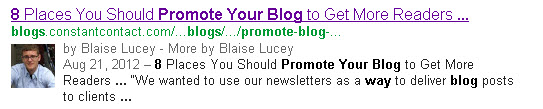
This is going to put a lot more emphasis on the writer behind the content, along with the content itself.
Luckily, you already downloaded my free guide about periphery marketing, so you’ll be able to seamlessly continue posting the content that is peripherally focused on your book, art, or service, therefore establishing your undisputed reign as a champion, expert, and author on the subject at hand for potential fans who are searching for that subject… right?
Here’s how to set up Google Authorship if you’re on WordPress
I covered the first steps to setting up a Google+ profile over on the Constant Contact blog.
Read the first three steps. It’s really easy.
What we didn’t cover was how to set up Google Authorship if you don’t have a big, corporate blog attached to a big, corporate email.
If you instead have a lowly, independent blog like BlaiseLucey.com, you have to navigate a dizzying array of WordPress obstacles to set it up.
That’s because people like us don’t have an “@wordpress.com” email. In my case, I used my “@gmail.com” one.
1. Grab the Google Authorship Code
First, grab this code: <a href=”[profile_url]?rel=author”>Google</a>.
It’s going to be your best friend for the next ten minutes.
2. Prepare a Page for the code
You first have to decide which Page should have the code. Usually, the “About” Page is your best bet, because that talks about you.
But before you put the code there:
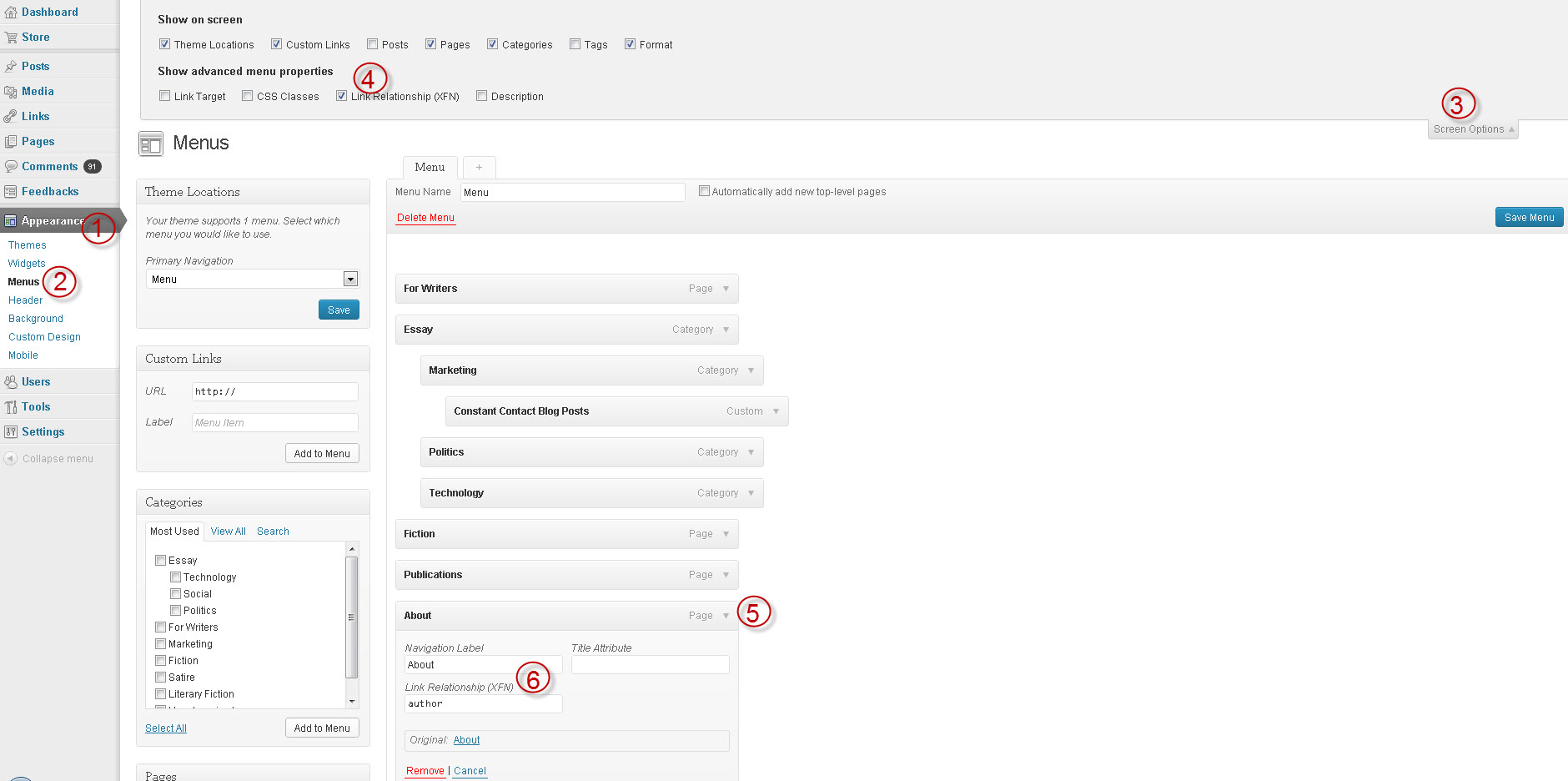
1) Click Appearance
2) Click Menus
3) Click “Screen Options.”
4) Check the “Link Relationship (XFN)” box.
5) Click the arrow on your “About” tab next to the word “Page”
6) Type “author” into the “Link Relationship (XFN) box
3. Insert the code
Now, click Pages > All Pages and edit your “About” page.
Once in the editing screen, click the “Text” tab, which will get you to the HTML editing part of WordPress.com.
Insert the code and personalize it:
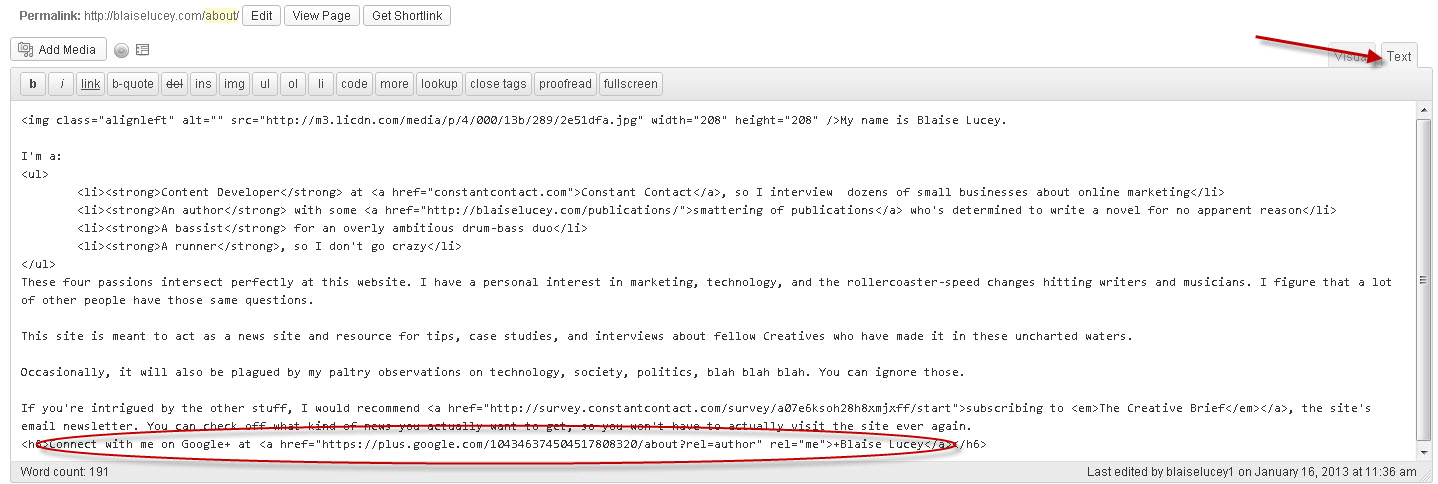
Now, paste the <a href=”[profile_url]?rel=author”>Google</a> code.
4. Personalize the code
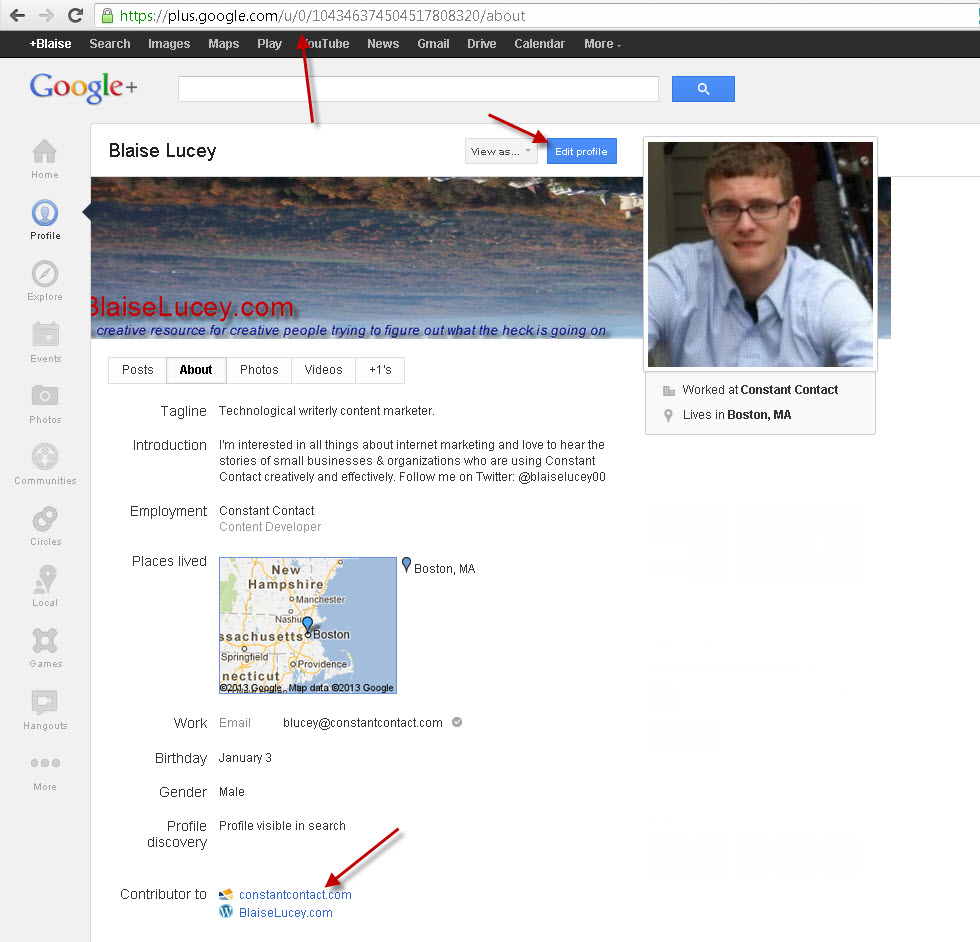
Now, visit your Google+ profile. Click the “About” tab and copy the URL.
On your webpage, replace [profile_url] with that URL, so the code looks something like:
<a href=”https://plus.google.com/109412257237874861202?rel=author”>Google</a>
The text from the code that will actually display on your site is the “>Google</a>” part.
That means that you’ll want to customize the text leading into the code. For example, you could write “connect with me on <code>Google+</a>.
Update your Page and you should be ready for the final step.
5. Edit the “Contributor to” information on your Google+ profile
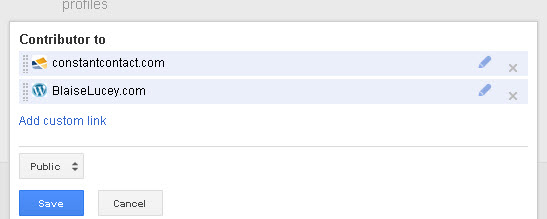
Now that you’ve updated your website with the code for Google Authorship, you need to make sure that Google+ knows you’re an author for that site.
To do this, click the “About” tab on your Google+ profile and edit the “Contributor to” information by clicking “Edit Profile” and then “Add custom link.”
The link you add should be the URL of the webpage you just updated with your Google+ authorship information.
Save those changes and… you’re done!
Figuring out if you did everything right
It can take a few days (or weeks, in the case of my Google+ profile) for your picture to emerge next to the search results.
Google has a tool that can help you figure out if you set up Google Authorship with your website, though.
Just go to Google’s Rich Snippet Tool, insert a blog post URL, and click “Preview.” That will show you whether or not your website now has Google+ enabled.
If you see your picture, you can lean back, relax… and get writing!
The breakdown
- This year is going to be huge for content creators of all sorts: if you have a blog, you need a Google+ account.
- Google Authorship is the tip of the iceberg. Google is planning to roll out Google AuthorRank soon, which will put a lot more emphasis on the writer instead of keywords, links, and all the technical SEO stuff.
- Blogging is becoming more important than ever to establish yourself as an author, thought leader, or content creator of any kind.
- For more stuff about Google Authorship, take a look at this video and look at the main Google Authorship page.


Leave a Reply